Invoicing for people who work for themselves.
Send a professional invoice in under a minute, take payment by card or Apple Pay, and see at a glance exactly who still owes you. For iPhone and iPad.
Free to startNo card requiredYour records stay in your iCloud
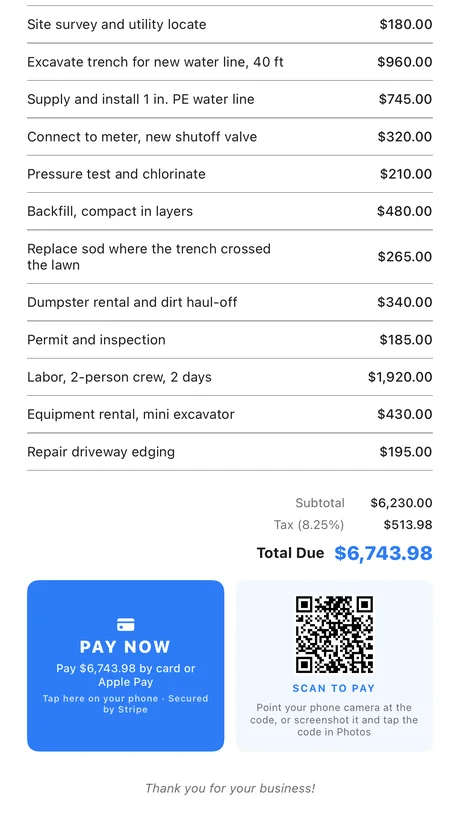
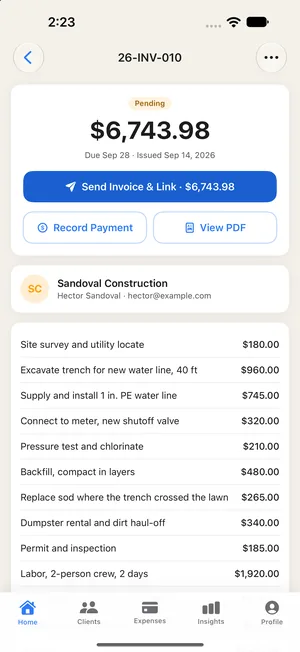
Owed, paid, and kept.
No accounting degree, no onboarding call, no desktop. These are real screens from the app, not mockups.
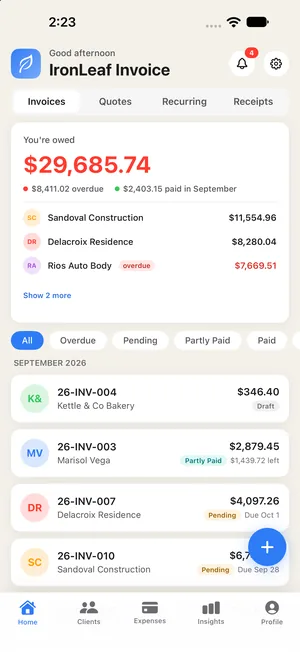
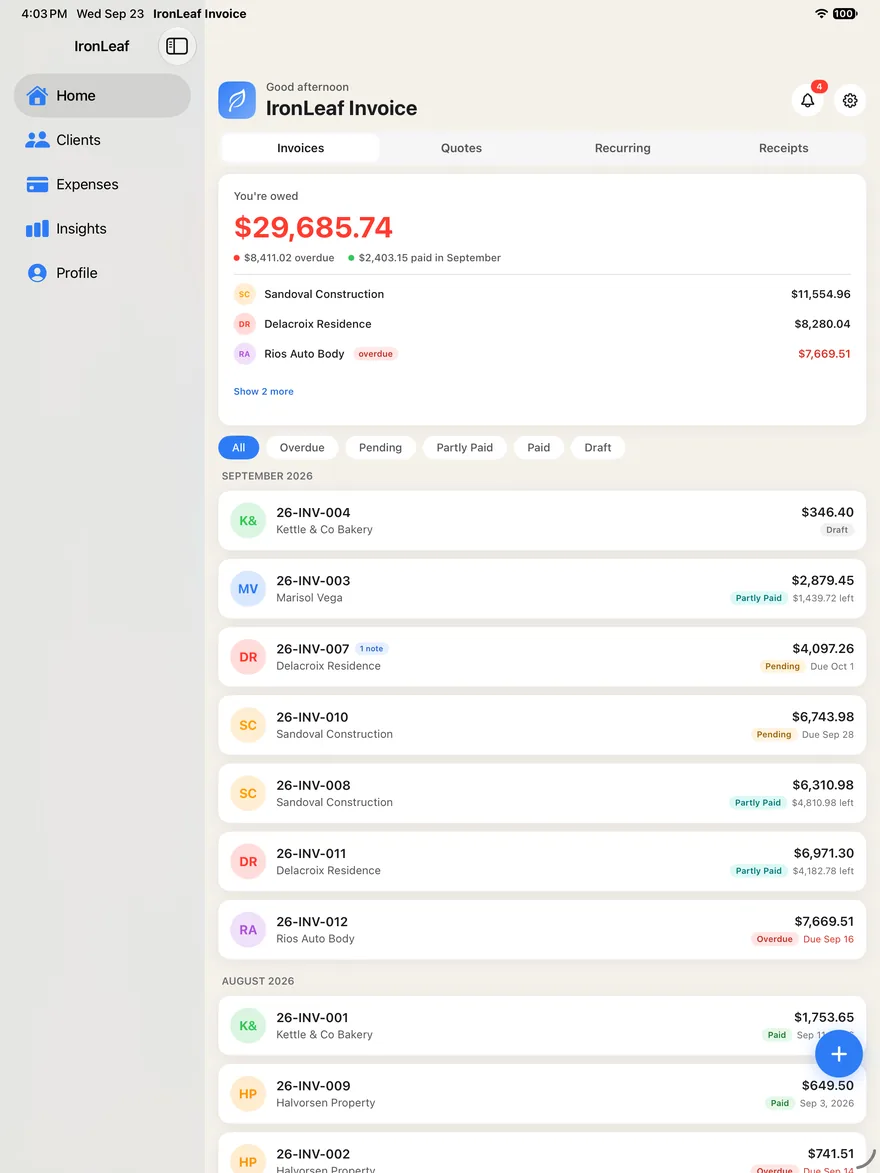
Know who owes you
The dashboard answers the question you actually ask on a Sunday night: who still owes me, and how much. Overdue is marked overdue. Nothing is buried in a report.
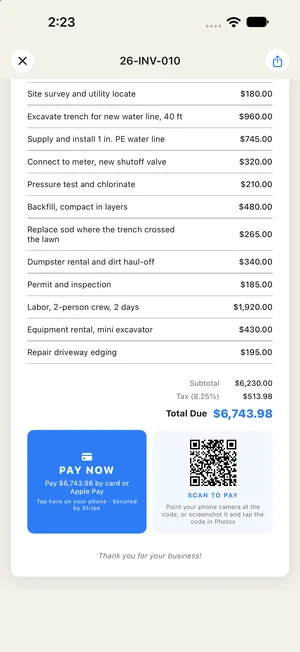
Get paid by card
Your customer gets a clean PDF with a Pay Now button and a code to scan. They pay by card or Apple Pay — no app, no account — and your phone tells you the moment it lands.
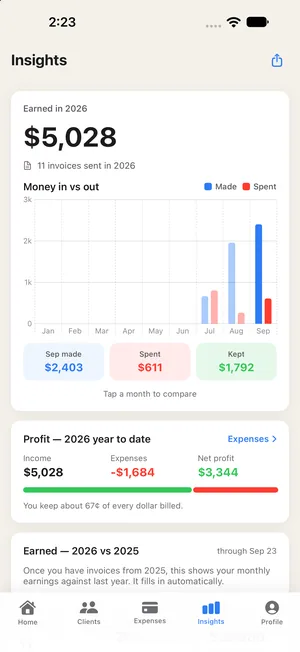
See what you kept
Insights sets what you made against what you spent, month by month, and exports it as a PDF your accountant can actually read.
Everything on the bill.
Listed the way the app would list it. Most of it is free; the lines marked Pro come with a subscription.
-
Invoices that look the part
Your logo, your color and your business details, on a document that holds up next to anything a much larger company would send. Long jobs paginate properly.
Included -
Photos of the finished work
Put before-and-after shots straight onto the invoice, so the customer sees what they’re paying for.
Included -
Card and Apple Pay links
Every invoice can carry a payment link. Stripe handles the card; the money goes to your own account, not ours.
Included -
Quotes that become invoices
Write the estimate first. When the customer says yes, it becomes the invoice without retyping a single line.
Included -
Expenses and your calendar
Log what a job cost as you go, and drop a booked service date straight into your iPhone calendar.
Included -
Recurring invoices
Weekly, every two weeks, monthly, quarterly or yearly. Each one is written for you on schedule and waits as a draft until you send it.
Pro -
Receipt scanning
Photograph a receipt and the vendor, the amount and the date fill themselves in, with the photo kept on the expense for tax time.
Pro -
Insights
Profit and trend reporting you can export as a PDF for your accountant.
Pro -
Premium templates and the full palette
Every invoice template and every brand color, not just the starter set.
Pro
The same book, on your iPad.
Your clients, invoices and prices live on your device and sync through your own iCloud account — so a quote you write in the van is waiting on the iPad when you sit down at home.
None of it is uploaded to us, sold, or shared. That’s how the app is built, not a policy we could change on a quiet afternoon. Read the privacy policy.
Two plans. No surprises.
Start free. Upgrade when the invoicing outgrows it.
Free
- Five sent invoices a month
- Unlimited clients and quotes
- Card payments through Stripe, with a 0.5% IronLeaf fee
- Your logo on every document
- A small “Created with IronLeaf Invoice” line at the foot of each invoice
Pro
- Unlimited invoices, and no “Created with” line
- No IronLeaf fee on card payments
- Recurring invoices
- Receipt scanning
- Insights — profit, trends and PDF reports
- Every premium template and the full brand palette
Pro is billed through your Apple ID and renews automatically until you cancel, which you can do anytime in your App Store settings.
A note on payments. IronLeaf is not a bank and never holds your money. Card payments are processed by Stripe, and funds settle into the Stripe account that belongs to you.
What a card payment costs. Stripe charges its own processing fee, currently 2.9% + 30¢ per successful card payment in the United States, with higher rates for international cards and currency conversion — see Stripe’s pricing. On top of that, IronLeaf takes 0.5% on the free plan and nothing on Pro. Your customer always pays exactly the invoice total; fees come out of what reaches your bank. Cash and checks you record yourself cost nothing.
Before you ask.
And if yours isn’t here, write to us — a person answers.
When can I download it?
IronLeaf Invoice is coming soon to the App Store, for iPhone and iPad.
Do my customers need the app?
No. They get a PDF by email or message with a link to pay by card or Apple Pay, on a page with your business name on it. No download, no account.
Who holds the money?
You do. Payments go through Stripe into the Stripe account that belongs to you, and from there to your bank. IronLeaf never takes custody of your customers’ funds.
What does a card payment cost me?
Stripe’s own fee — currently 2.9% + 30¢ for a US card — plus 0.5% to IronLeaf on the free plan, or nothing to IronLeaf on Pro. Your customer pays the invoice total either way; the fees come out of what reaches your bank.
Where is my data kept?
On your device, and in your own iCloud account if you’re signed in — that’s how an invoice written on your iPhone shows up on your iPad. Your clients and invoices are not stored on our servers. The privacy policy has the detail.
How do I cancel Pro?
In your Apple ID’s subscription settings, anytime. Turn off auto-renew at least 24 hours before the end of the current period and you won’t be charged again.
Do the job. We’ll handle the paperwork.
Coming soon to the App Store, for iPhone and iPad.